
Ecotour Mobile App
An AR-based App to enhance student's field trip learning experience
UX Design /Product Innovation /UX Research
OVERVIEW
Project brief
This was my capstone project at Indiana University, our team worked with Wisdom Tools, a company based in Indiana that specializes in developing immersive learning tools. The project aims at enhancing the field trip learning experience and ecological understanding for students.
Tools: Sketch, Principle
Role: Research, UX/UI Design
Keyword: Mobile, Field Research

Project Team & Client

Final Product Pitch
Problems & Oppourtines
The field trip is an important part of environmental education. However, in reality, students often
lack interest in ecological studies. Moreover, due to the limited budget and time, they cannot understand the environment comprehensively and deeply in a short amount of time. Thus, Wisdom Tools approached us to create an innovative method to assist and engage students on the field trip.

RESEARCH
Approach the problem
To inform our design decisions and have a deep understanding of the goals and challenges in the field trip. We started off by conducting field research, interviews, and surveys.
.png)
Participants
To identify the issues from different perspectives, semi-structured interviews were conducted with high school teachers, students, and tour guides.
.png)
Interview Script
-
What are the major goals of a field trip?
-
What are the activities during the trip?
-
What are the major challenges?
-
What can be improved during the trip?
.png)
Field Research
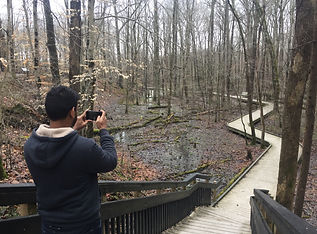
Our team visited the Muscatatuck Wildlife Refuge to conduct field observation, surveys, and interviews to analyze the data about users' goals and challenges.
Observations & Interviews


"Don't drag us into the middle of nowhere to just show us a specimen,
give a vivid description, draw on people's empathy and explain the history and dangers of ignoring environmental problems.”
* “I think the field trip offers us great hands-on learning opportunities, but we don't have enough time to explore all the different sites, animals, and plants."
“It's hard for me to manage a large group of students, and motivate them to actively participate in the learning activities."
* "The tour guides are very helpful, but they are too busy to answer all my questions, and it's hard to quickly find the relevant information I need from the handouts."
“We mostly used mobile phones, pencils, and paper to record and search for information for our observations.”


Participants believes in searching online, tour guides, and visit historic site are the top 3 ways to enhance ecological understanding
The main goals for field trips are hands-on learning opportunity, followed by engaging learning styles, and new learning site.
Participants needs to quickly find relevant information, a more engaging way in teaching, learning, and improve class management.
Problem Space
.png)
Ecological
Students lack motivation to learn about the environment

Management
Difficult to manage a large group of students
.png)
Engagement
Field trips are not very engaging for all students

Time Constraint
Limited time to explore everything during the trip
ANALYSIS
Understanding the users
Based on the research insights, I created a journey map to analyze users' behavior and experiences at different stages during the field trip. The user personas helped the team empathize with our users' goals
and challenges. View Persona

SYNTHESIS
Key insights to design goals
After collecting and analyzing research insights, an affinity map was generated by reorganizing the data into key insights, and these insights help us to define a clear design direction and frame the design goals.
OUTCOME GOALS

Planning
Management
Learning
Entertaining
Reflection
DESIGN GOALS
Reframe the problem
“ To enhance field trip learning experience and improve ecologically understanding, How might we find an engaging way in teaching, learning, and improve class management? "
BRAINSTORMING
Concept generation
The brainstorming session was a diverging process, to create and validate some design ideas, we generated 9 ideas and research over 30+ papers and articles related to mobile, video, AR, VR, etc.


AR Mobile App
Mobile App for students to search for different animals and plants on the trip.
Virtual Reality Center
Show students how the environment is changing and showing immersive content.
Treasure Hunt Game
A game where students are asked to find different things on the trip using a map.
Time Travel
Showing students how the environment has been destroyed and animals became extinct.
Feature Selection
Keeping in mind the hierarchy of our users' pain points and needs, we came across AR technology while we exploring different solutions, as it provides couples of opportunities and benefits to solve the main problem: students‘ engagement
-
Make the difficult concept easy to understand.
-
keeps students interested and motivated in the learning process.
-
Enable creative thinking.
Based on team discussion, we choose the following features to create an engaging field trip experience.
How might we help teachers manage field trips more efficiently?

Tour Mode
-
Teachers can start a tour, check stats, add students on the trip.
-
See information like the places, animals, plants on the map.
How might we enable students to explore and learn about nature?

Search & Explore
-
Find animals and plants using a phone camera.
-
Learn about the location, habitat and fun facts.
How might we create an engaging experience for students?

AR-Based Learning
-
Scan plants and animals to quickly find relevant information.
-
Timeline feature to see and learn historical background better.
How might we make sure that students are safe on the trip?

Location & Tracking
-
Track students location using wifi hotspot
-
Notification if the students' phone is disconnected or out of reach.
WIREFRAMING
Iterating user interface
As we moved on to designing the interface of the application, I wireframed the UI screens and conducted
an initial user testing session.

DESIGN DECISION
Synthesize all the findings
We distilled the research data into design goals to ensure our product design will meet the expectations and needs of the users and stakeholders.
Visual & Interaction Design
1. Sign in + Map: View your current location & a map of the field trip location, or search for different places of interest on the map and learn more about them.


Sign in/Sign up
View the Map & Navigate

View details of field trip location
2. Explore: Explore and search any activities, wildlife, plants & trees on the field trip. Click on any particular card to learn more about them.

Explore & Search

Learn fun facts about animals.

View more related photos
3. AR Scanning: Open the camera and point to any animal/plant to scan and find related information about them. Swipe to find other details like quiz, photos, etc.


Use camera to scan animal/plant to find relevant information.
Swipe screen to explore details like facts, quiz, photos, etc.

Quiz sections to engage students in environmental learning.
4. AR Artifact: Users can place virtual objects in the real environment to learn more about them. This feature will help instructors teach the endangered animals or plants or hard to find in the wetland. The timeline feature can create environmental awareness.
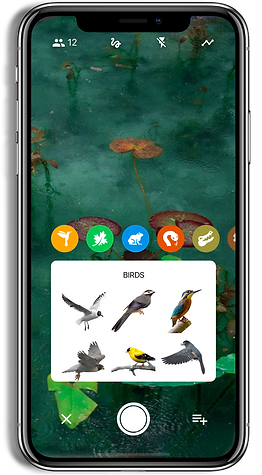


Place virtual objects in the real environment to learn more about them
Check how the environment changes over the years
Highlight & share any particular area of interest on the field trip.
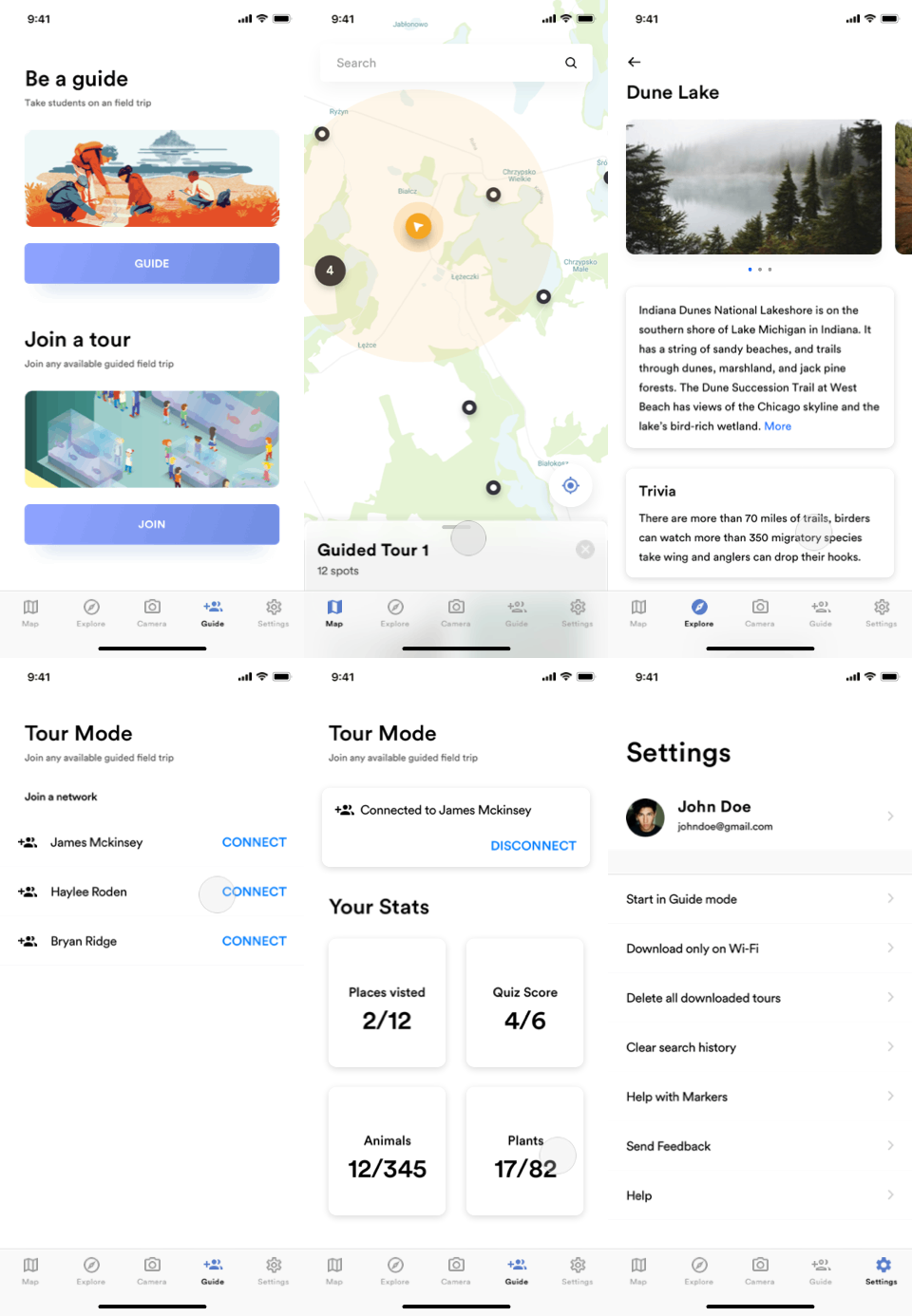
5. Start A Tour: With our Creator, teachers can build virtual field trips or empower students to create their own immersive tours to best suit schedule.


Teachers can become a tour guide, students can join the tour through wifi hotspot technology.
Students can join any available tour by selecting their assigned tour guide.
View information on the selected tour and start navigation.
6. During The Tour: In the tour mode, teachers can build virtual field trips and empower students to create their own immersive tours to best suit schedule.

Use the map to get info about tour directions and interesting places.


Students can check stats about their field trip.
Use settings to edit their profile information, send feedback, etc.
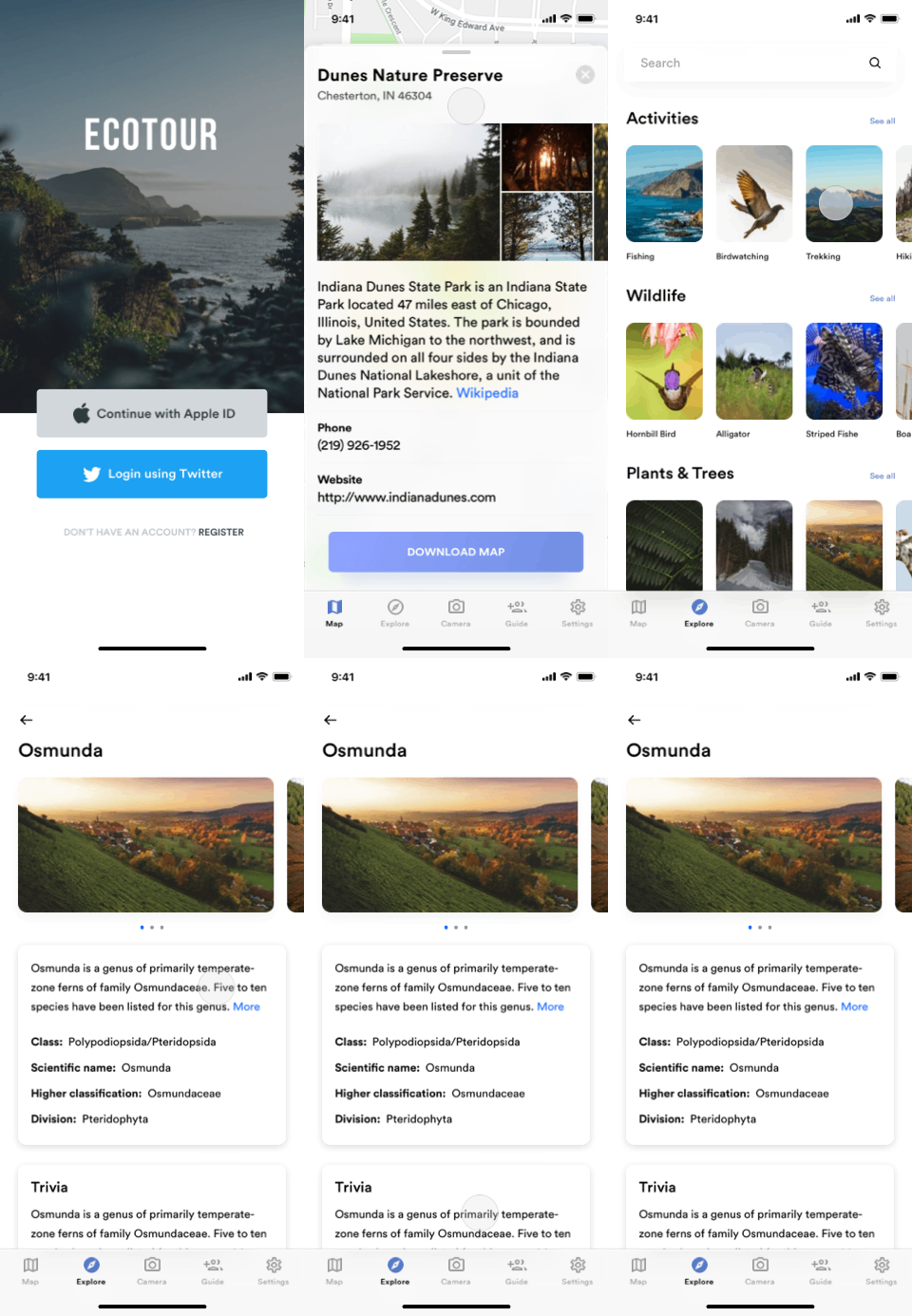
Explore different activities
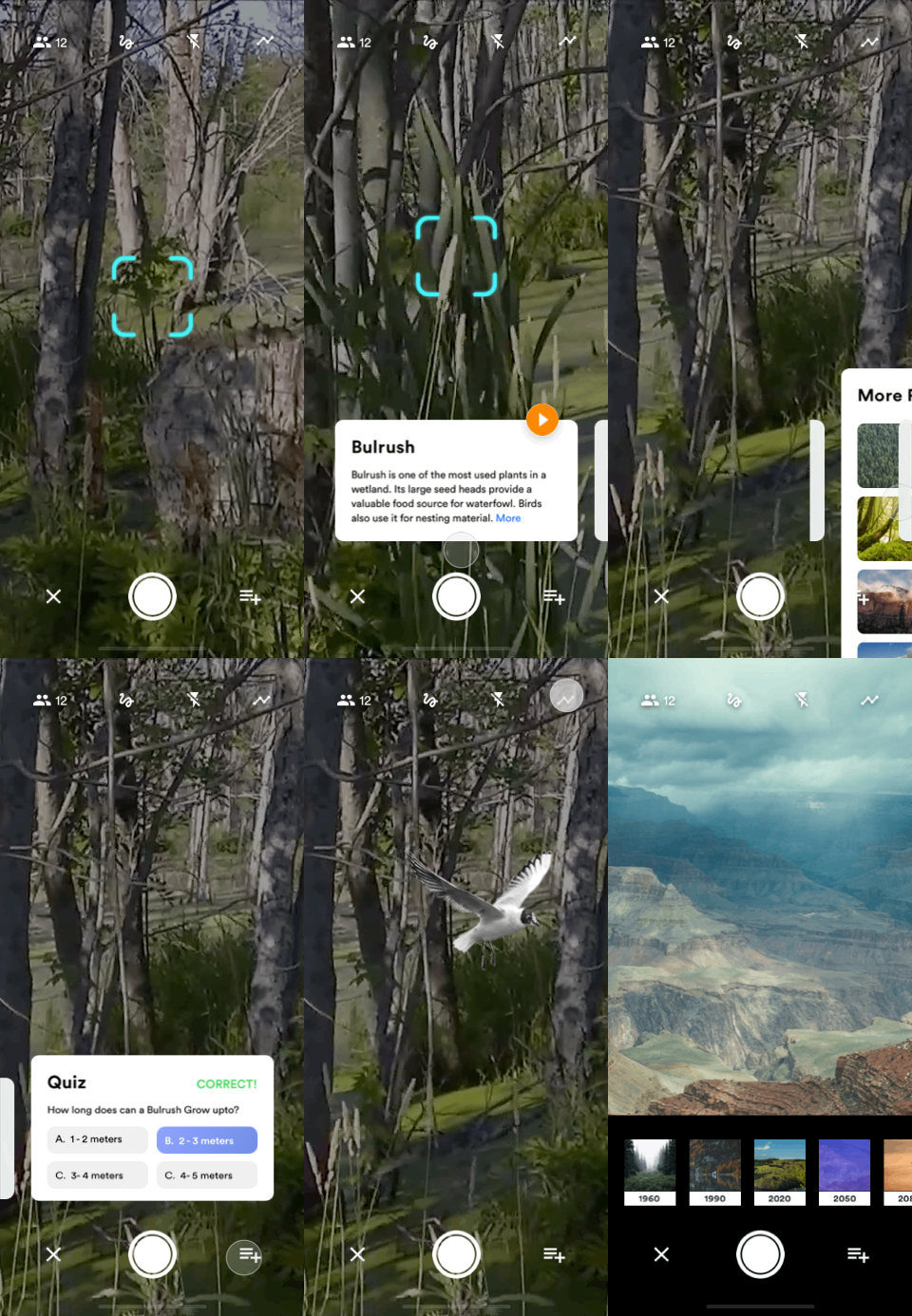
AR Scan & Timeline feature
Select & Join a tour
USER TESTING
Evaluation and walkthroughs
We recruited 7 students and 1 teacher at Indiana University to test out our prototype. We choose 5 tasks which utilize the primary function of the App for collecting feedbacks to answer the following questions:
-
Are these features useful for helping students/teachers on the field trip?
-
Is this application easy to use? Will the users understand and utilize the feature?
-
Are there any changes to be made to improve this application?
Test Process

Test Results

SUS Score


CONCLUSION
Learnings & Outcome
Find The Right Balance
UX balances business, users, and technology. In the user research session, the teacher shows the concern that AR can be a distraction in the students' learning process. So we think hard on how to create an engaging experience without the AR experience itself becoming a hindrance, and finally, came up with the AR artifacts and timeline feature. To our surprise, they were seen as the most interesting and engaging features.
Limitations
Considering the technical feasibility, the AR feature was not fully implemented into our prototype, so we have to explain some confusing points in the user testing, I believe more issues will be revealed after testing a fully functional prototype. Another limitation is that we did not test the prototype in a school field trip, I think testing in our users' own context will help us to extract interesting insights and potential problems.

Say cheese!
Overall, the designs was handed off to developers for implementation, the outcome of this project was greatly appreciated by our stakeholders. We did the product presentation and received valuable feedback from WisdomTools and other professionals who participated in user testing. This project also earned the "People's choice reward" at the Indiana University Capstone Event.
Thanks for making this far!

I’d love to hear your feedbacks or suggestions!